The app blocker that tells you what to do instead
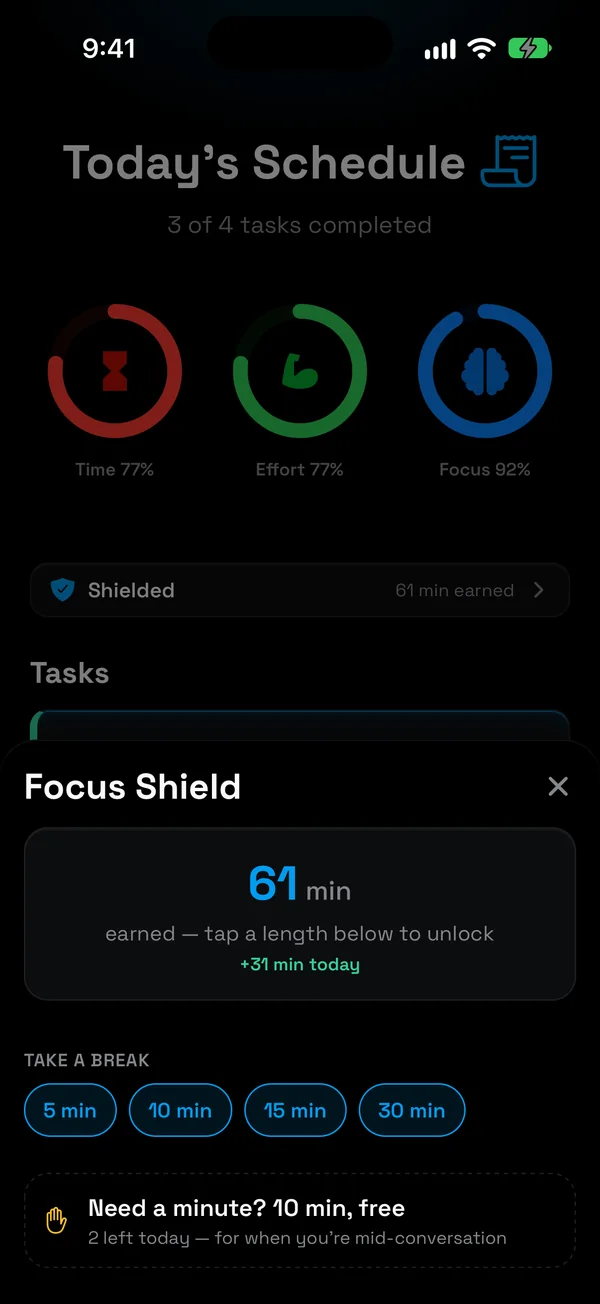
NoCrast puts distracting apps on hold until your tasks are done. Open one anyway, and you see your next small step instead of the feed. Finish it, and you earn the minutes back.
New subscribers get the first 7 days free, then NoCrast Premium monthly or yearly. Cancel any time.


What is an app blocker?
An app blocker keeps the apps that pull you away out of reach for a while: social media, games, video, news, whatever you open without thinking. There are two common kinds. Some set a time limit: you get thirty minutes of an app a day, then it closes. Others keep an app closed completely, on a schedule or until you switch them off.
Both help, and both have the same weak spot: when the limit hits, the urge is still there. You tap "ignore", open the browser version, or switch to the next app. Saying no deals with the app, not with the reason you reached for your phone, which is usually a task you don't want to start.
NoCrast is an app blocker built around that reason. It holds your distracting apps until your tasks are done, and when you reach for one anyway, it shows you the next small step of the thing you are avoiding. Your phone stops being the way out of the task and becomes the way back into it.
How the app blocker works
Three things happen, and they repeat every day you choose.
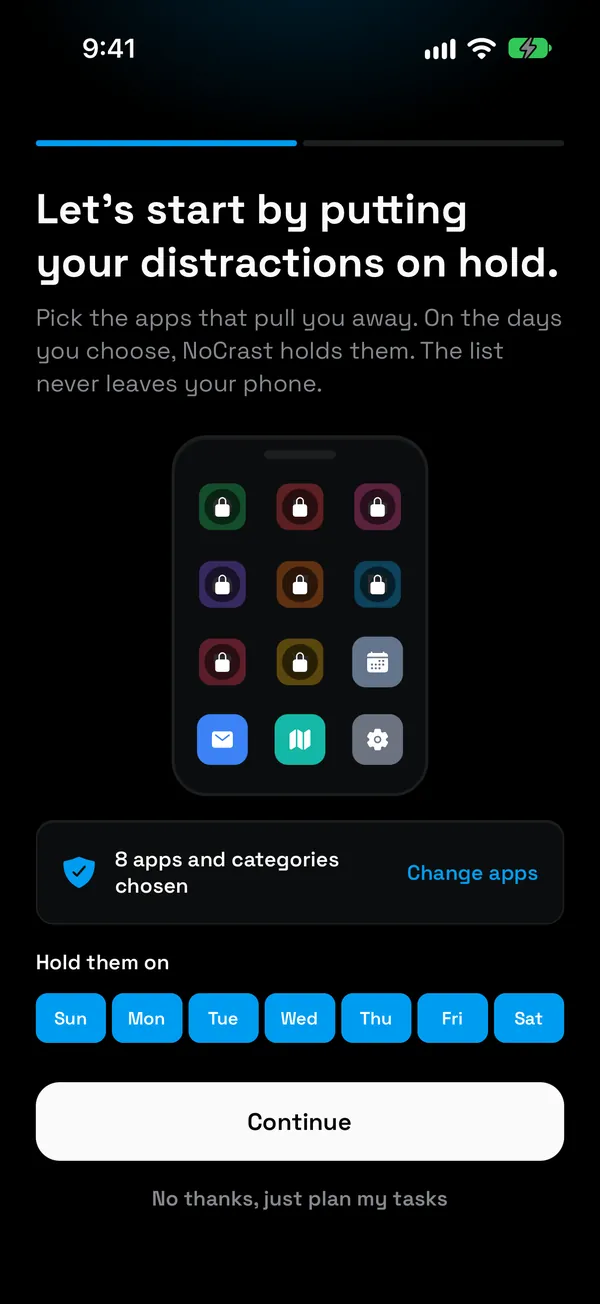
Choose what pulls you away
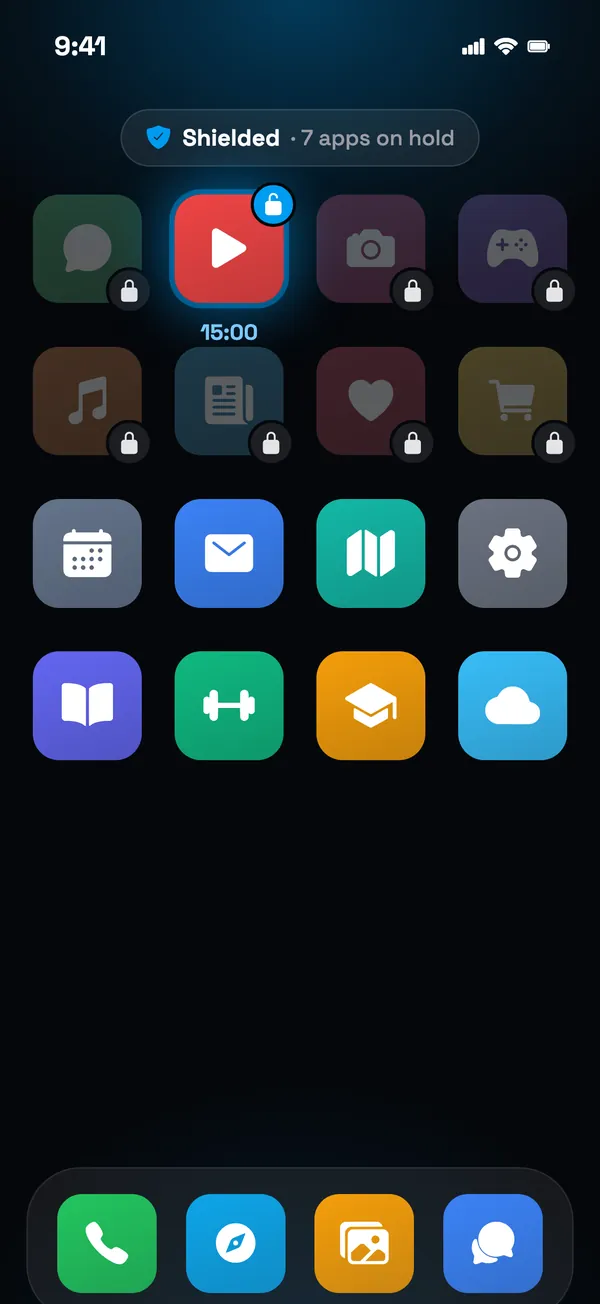
Pick the apps and categories, and the days you need help. On iPhone it uses Apple's Screen Time, so your list never leaves your phone.
Open one, get your next step
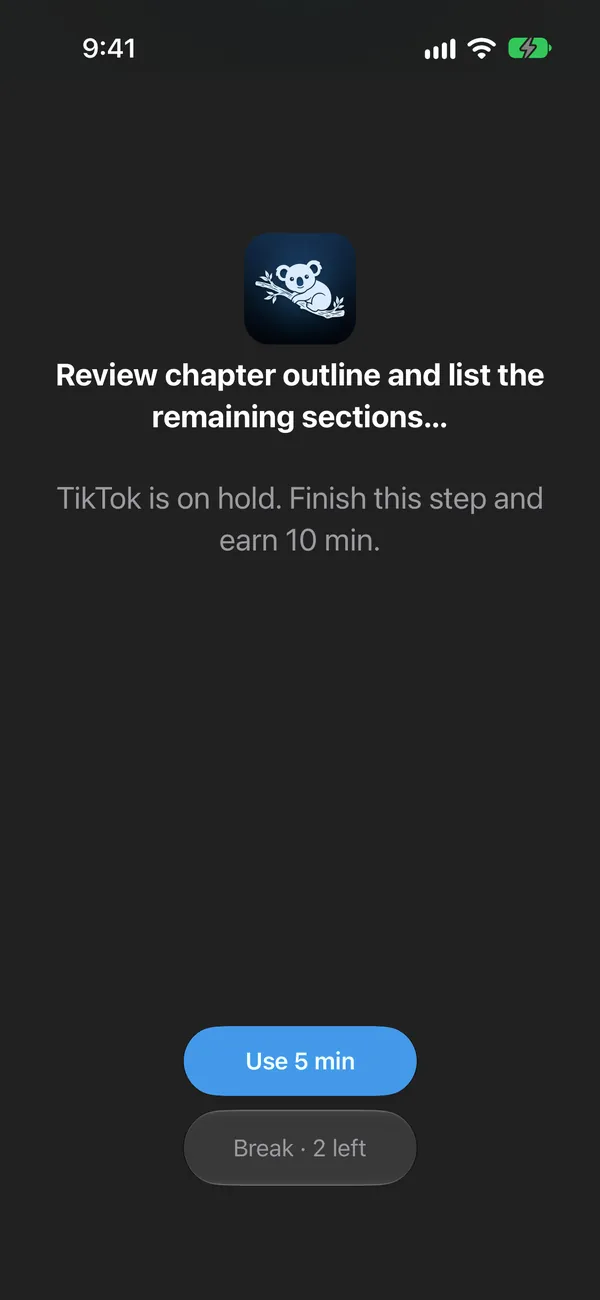
Instead of the feed you see the task you're on and the minutes it earns. The reflex becomes a reminder.
Finish it, earn the minutes
Every task you finish earns screen time; hard or boring ones a little more. Two short free breaks a day for when you really need one.
Get through everything you planned, and your apps are free for the rest of the day. Nothing to argue with, nothing to switch off: the work is done, so the phone is yours.
Not just a blocker. A plan for the time you get back.
Most app blockers only say no. NoCrast also says what to do: describe what you keep putting off, and its AI breaks it into small steps you can start today.
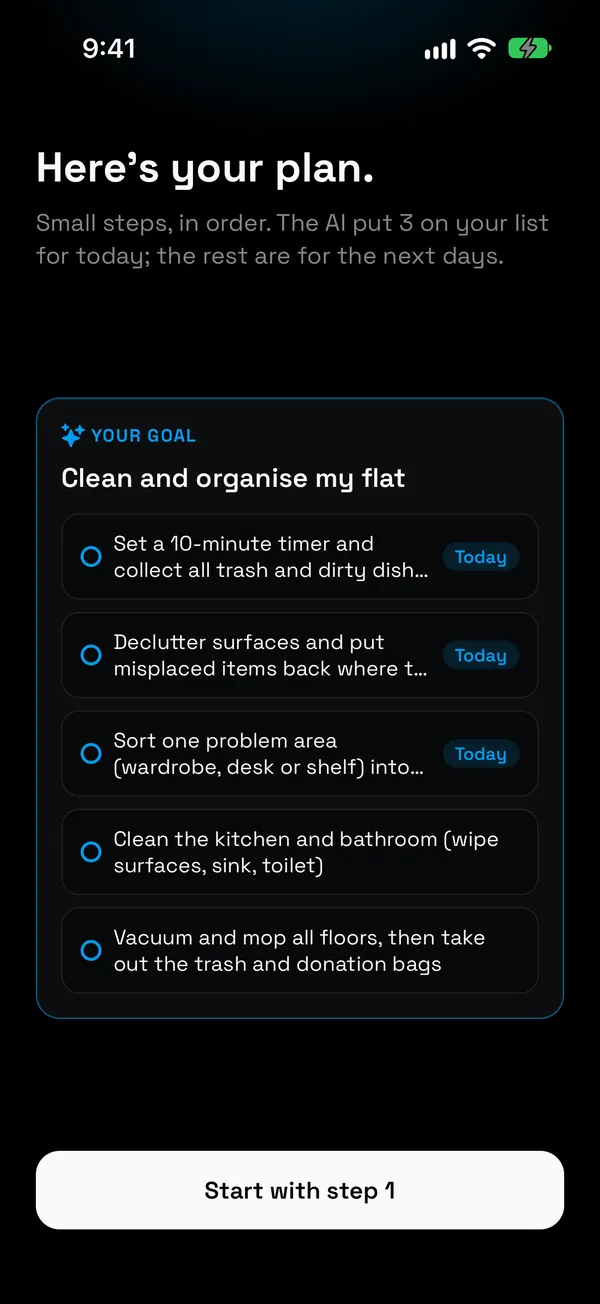
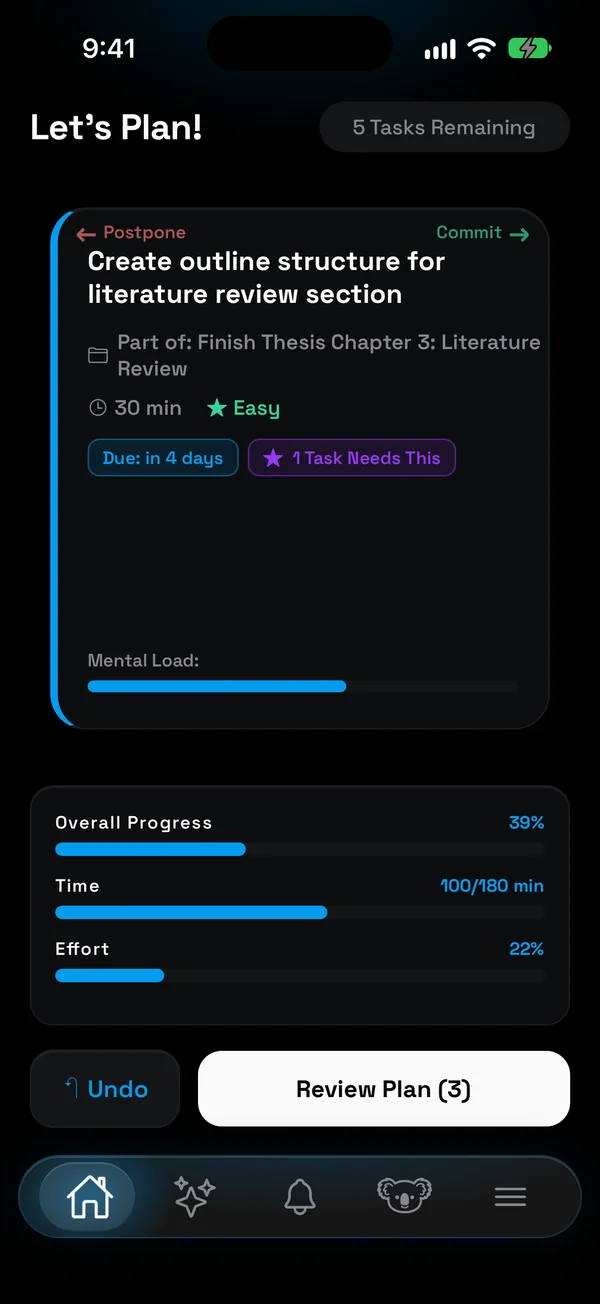
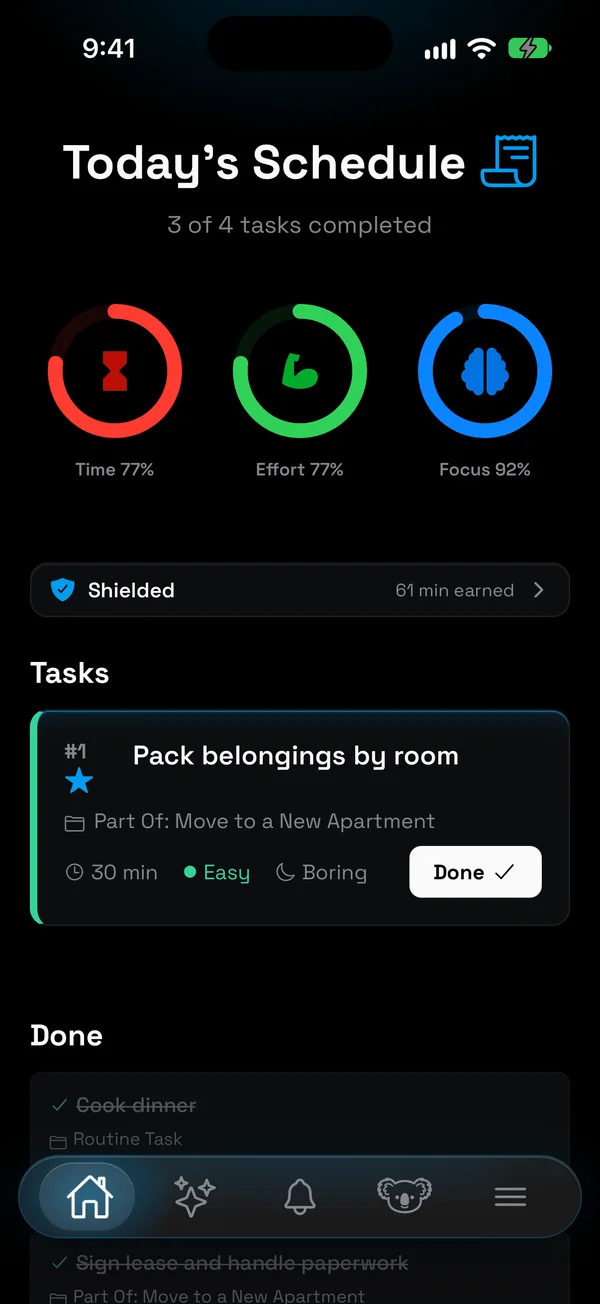
A big goal like "finish my thesis chapter" or "launch my portfolio website" becomes a short list of steps, each with its time, effort and focus. Steps know what they depend on, so you always see what is ready to start. Already have a to-do list? Paste it, or take a photo of it, and NoCrast turns it into tasks.
Each morning you swipe through the tasks: right to commit, left to postpone. Rings for time, effort and focus show when you are about to take on too much, and whatever you don't finish comes back tomorrow. Tired and not sure where to start? Ask the AI buddy, and it suggests the one task that fits right now. That is the difference between a blocker and a plan: when the apps are on hold, you already know what to do instead.
How to block apps on iPhone with NoCrast
- Get NoCrast from the App Store and create your account.
- Describe one thing you keep putting off. You see your first plan right away: small steps, the first one ready for today.
- Choose the apps to put on hold. NoCrast opens Apple's own Screen Time picker. Pick single apps or whole categories, like Social or Games, and the days you want help.
- Plan today. Commit to a few tasks and postpone the rest.
- Work, and let the hold do its job. When you open a held app, you see your next step. Finish it, and the minutes are yours to spend in 5, 10, 15 or 30 minute breaks.
Prefer to start with what is built into your iPhone? Screen Time's Time Allowances and Block App work without any extra app. Our guide How to Block Apps on iPhone shows each step for iOS 27.
Screen Time limits or NoCrast?
Screen Time decides how long. NoCrast decides what comes first.
| Compared | Screen Time | NoCrast |
|---|---|---|
| Limits | Time per category | Your apps, until your tasks are done |
| When you open one | The limit, often skipped with a tap | Your next step, and the minutes it earns |
| The time you get back | Up to you | A plan: small steps, today's few tasks |
| Getting time back | Wait, or ignore the limit | Finish a task; two free breaks a day |
Screen Time is enough if you only want a cap, say an hour of social media a day, and you rarely talk yourself past it. It is free, built in, and works well with a passcode someone else chooses.
NoCrast is for when the cap isn't the problem: when you reach for your phone because a task feels too big to start. It holds the apps until the work is done and turns the task into steps small enough to begin. You can use both: Screen Time for hard limits, NoCrast for the apps that get between you and your work.
App blocker for iPhone and Android
On iPhone
NoCrast uses Apple's Screen Time, the same system iOS uses for its own limits. You choose apps or whole categories in Apple's picker, and the list of apps never leaves your phone. A held app shows NoCrast's hold screen with your next step.
On Android
NoCrast shows its own hold screen when you open a held app. It needs usage access and permission to show over other apps, and shows a notification while it runs. The list of apps you hold stays on your phone. Get it on Google Play.
Your plan syncs between iPhone, Android and the web app at nocrast.app, so you can plan on your laptop and work through the steps on your phone.
What to look for in an app blocker for iPhone
The best app blocker is the one you keep using after the first week. These are the things that decide that:
- Hard to skip, with an honest way out. A blocker you can dismiss with one tap stops working on day three. One with no exit at all gets deleted. Look for a real hold plus a small, limited escape for emergencies.
- Built on Screen Time. On iPhone, Apple's Screen Time is the system made for holding apps, and with it your list of apps stays on the device.
- Apps and categories. Holding a whole category, like Social, catches the next app you install too.
- The days you need it. Weekdays for work, every day before exams: the schedule should match your life, not the other way round.
- Rewards, not just punishment. Earning time back for finished work keeps you motivated where a flat ban breeds resentment.
- An answer to "what now?" The moment a blocker says no is the moment you need a next step. A blocker that hands you one turns lost minutes into progress.
- Works across your devices. If you plan on a laptop and work on a phone, your tasks should follow you.
Who NoCrast is for
If you know exactly what you should be doing and still can't make yourself start, NoCrast is built for you. Three places it helps most:
An app blocker for studying
A thesis, an exam, a stack of reading that keeps losing to the phone. Put social media and games on hold on your study days, turn "write the chapter" into steps like "outline section 2" and "find three sources", and earn your breaks one step at a time. Revision weeks look different from normal ones, so choose the days to match.
An app blocker for social media
TikTok, Instagram, YouTube, Reddit, X: hold the ones you open without thinking, or the whole Social category so the next app you install is covered too. The feed is still there when your tasks are done, and the minutes you earn decide how long you spend on it, not the app.
Focus when you work from home
At home nobody sees the hour that disappears into a feed. NoCrast gives the day a shape: a few committed tasks each morning, the apps on hold until they are done, and a clear end when the plan is finished. Plan on your laptop at nocrast.app, work through the steps on your phone.
Questions
Is NoCrast an app blocker?
Yes, with a twist: the apps you choose stay on hold until your tasks are done, and every task you finish earns minutes on them. Two short free breaks a day are there for when you really need one.
Is there a free app blocker for iPhone?
Yes: Screen Time is built into every iPhone and costs nothing. It can limit apps by time or keep them closed completely. NoCrast adds what Screen Time doesn't do, a plan and earned time, and new subscribers get the first 7 days free.
Can I block apps on iPhone without an app?
Yes, with Screen Time: Settings › Screen Time › Time Allowances for daily limits, or Apps & Websites › Block App to keep an app closed. Our guide How to Block Apps on iPhone shows each step.
What counts as a task?
Anything on your plan for today: the steps NoCrast's AI made from your goals, tasks you add yourself, or tasks from a list you pasted or photographed. You decide each morning which ones you commit to.
Which apps can I put on hold?
Any you choose: social media, games, video, whatever pulls you away. On iPhone you can also pick whole categories.
What if I really need a held app?
Use the minutes you have earned, or one of your two short free breaks a day. Apps you don't choose are never held.
Can I choose the days?
Yes. You pick the days NoCrast holds your apps, for example weekdays only.
What happens when I finish all my tasks?
Your apps are free for the rest of the day. Whatever you didn't finish comes back the next day, and you plan again in the morning.
Does it work on Android?
Yes. On Android NoCrast shows its own hold screen; on iPhone it uses Apple's Screen Time. Your plan syncs between both and the web.
Is my list of apps private?
Yes. Which apps you hold stays on your phone.
How much does it cost?
New subscribers get the first 7 days free. After that, NoCrast Premium is monthly or yearly; the app shows the price for your country before you buy.
Put the distractions on hold. Start with one small step.