The procrastination app that gets you started
Your to-do list isn't the problem. Your phone is.
You know what you should be doing. NoCrast helps with the hard part: starting. Its AI turns the task you keep putting off into small steps, and the apps that pull you away wait until the first one is done.
New subscribers get the first 7 days free, then NoCrast Premium monthly or yearly. Cancel any time.


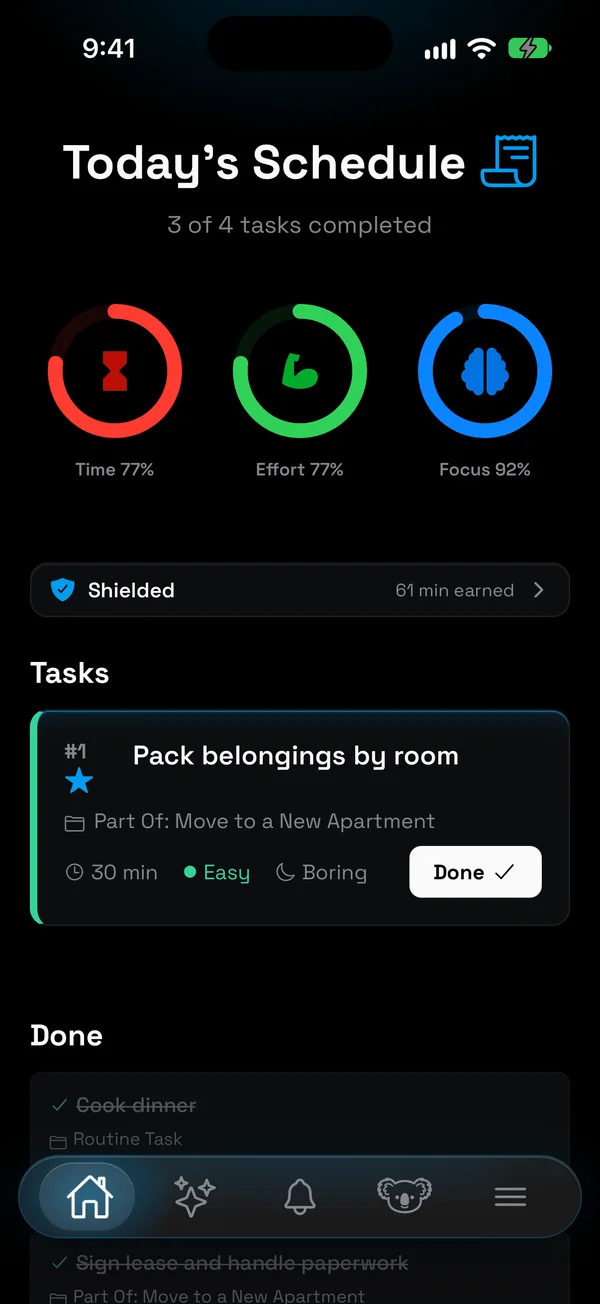
Your to-do list isn't the problem
Most people who procrastinate already have a list, often a good one. The problem isn't knowing what to do. It's the moment between knowing and starting, and on most days that moment belongs to the phone. One tap, and the hard thing is replaced by something easy.
That is why another to-do app rarely helps. It organises the list and leaves that moment alone. A procrastination app has to work on the moment itself: make the first step small enough to start, and make the easy escape a little less easy.
NoCrast does both. It is a planner and an app blocker in one: the AI breaks your task into steps, and your distracting apps stay on hold until the steps are done.
Why we put things off, and what helps
Not a theory, just the everyday reasons a task stays undone, and what NoCrast does about each.
- The task is too big. "Write the thesis" has no first move. NoCrast splits it into steps that each fit the length you choose, 30 minutes for example.
- The first step is unclear. Each step says what to do, how long it takes, and how much effort and focus it needs. Steps that depend on others wait their turn.
- Something easier is one tap away. Pick the apps that tempt you most, and on your chosen days they wait. Reach for one, and your next step appears in place of the feed.
- Starting doesn't pay. Every finished step earns screen time, so the reward comes after the work, not instead of it.
- You're tired and can't decide. Tell the AI buddy how much time and energy you have, and it recommends a task to match.
- Yesterday went badly. Unfinished tasks simply move on to the next day. No red overdue pile, just today's plan.
How NoCrast helps you stop procrastinating
Break it down
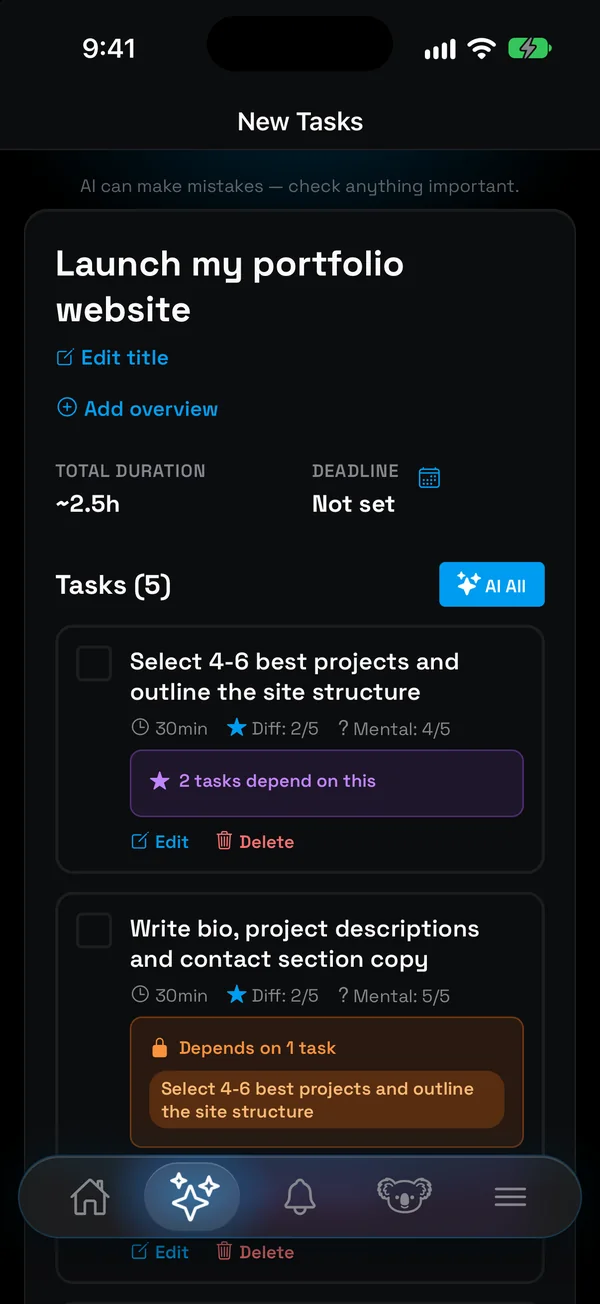
Describe the goal in your own words, like "launch my portfolio website". NoCrast's AI turns it into a handful of tasks, each with its time, difficulty and mental load, and shows which ones depend on each other. Edit anything that doesn't fit.
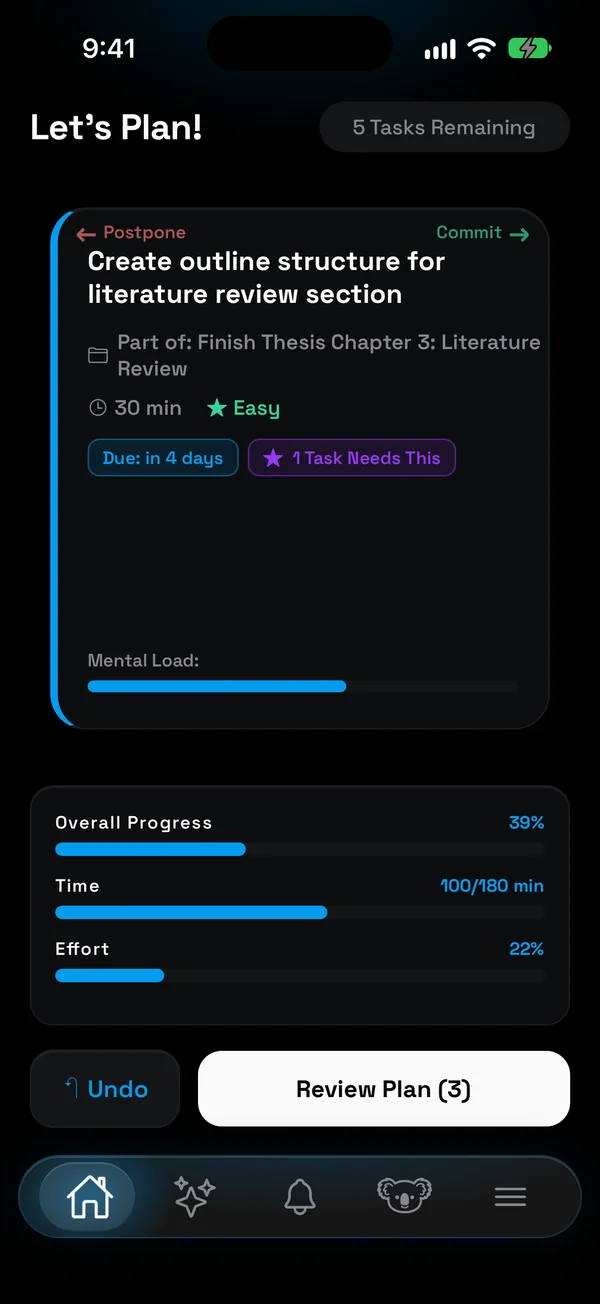
Plan today with a swipe
Right means today, left means later. Rings for time, effort and focus fill as you go, so you notice before you promise yourself an impossible day.
Keep the escape on hold
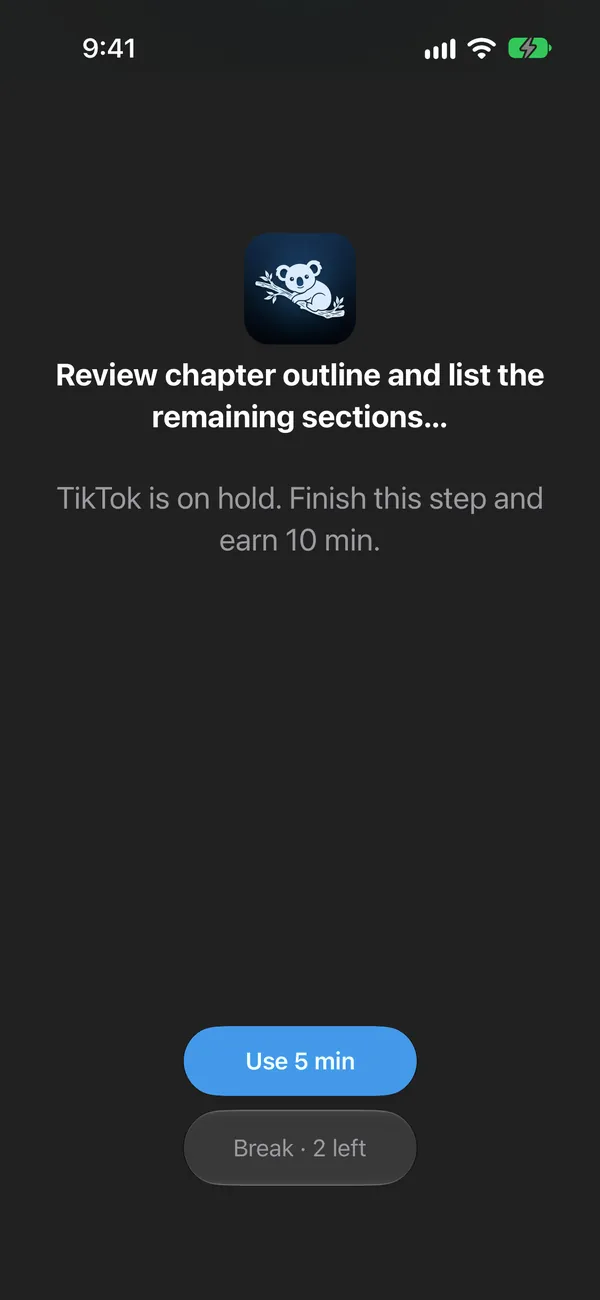
On your chosen days, the apps that pull you away wait until the work is finished. If you open one out of habit, NoCrast puts the current step in front of you, with the minutes it is worth.
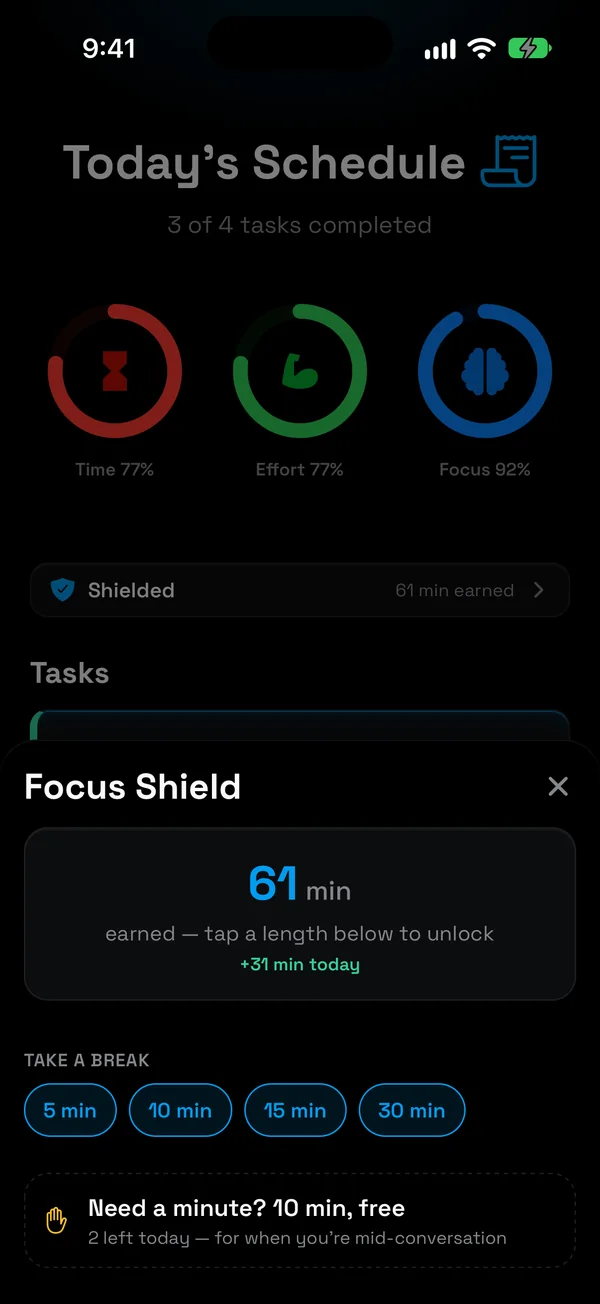
Earn your breaks
Every finished task earns minutes, a little more for hard or boring ones. Spend them in breaks of 5 to 30 minutes, with two free breaks a day for emergencies.
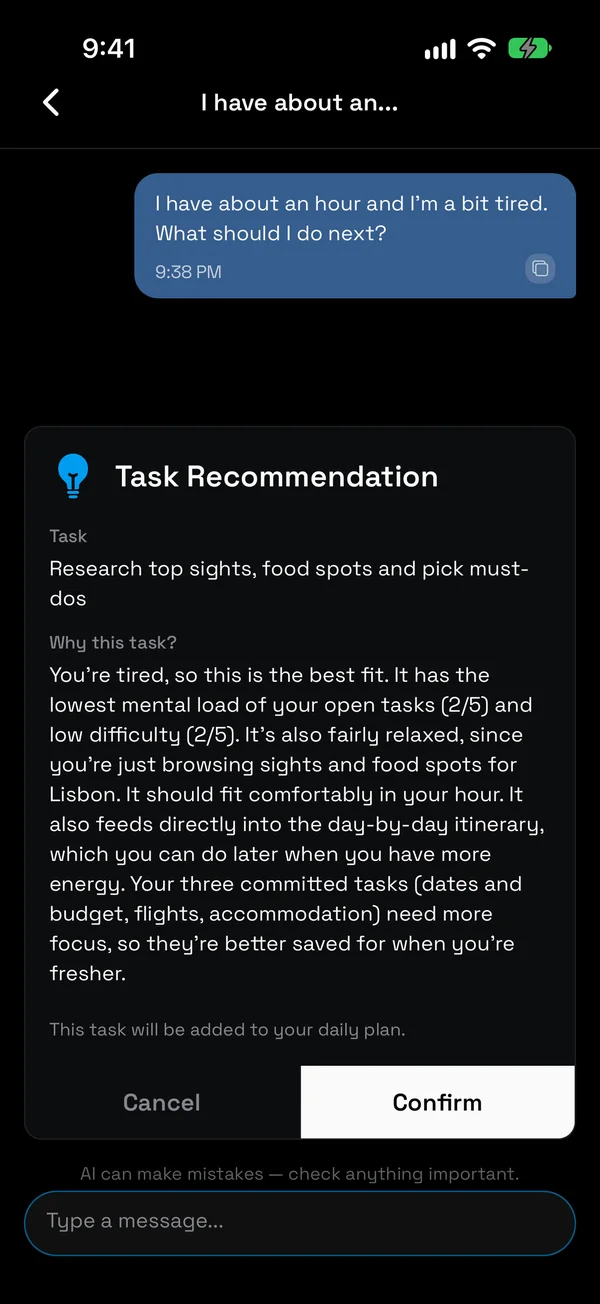
Ask when you're stuck
"I have about an hour and I'm a bit tired. What should I do next?" The AI buddy looks at your open tasks and picks the one that fits, and tells you why.
Bring in the list you already have
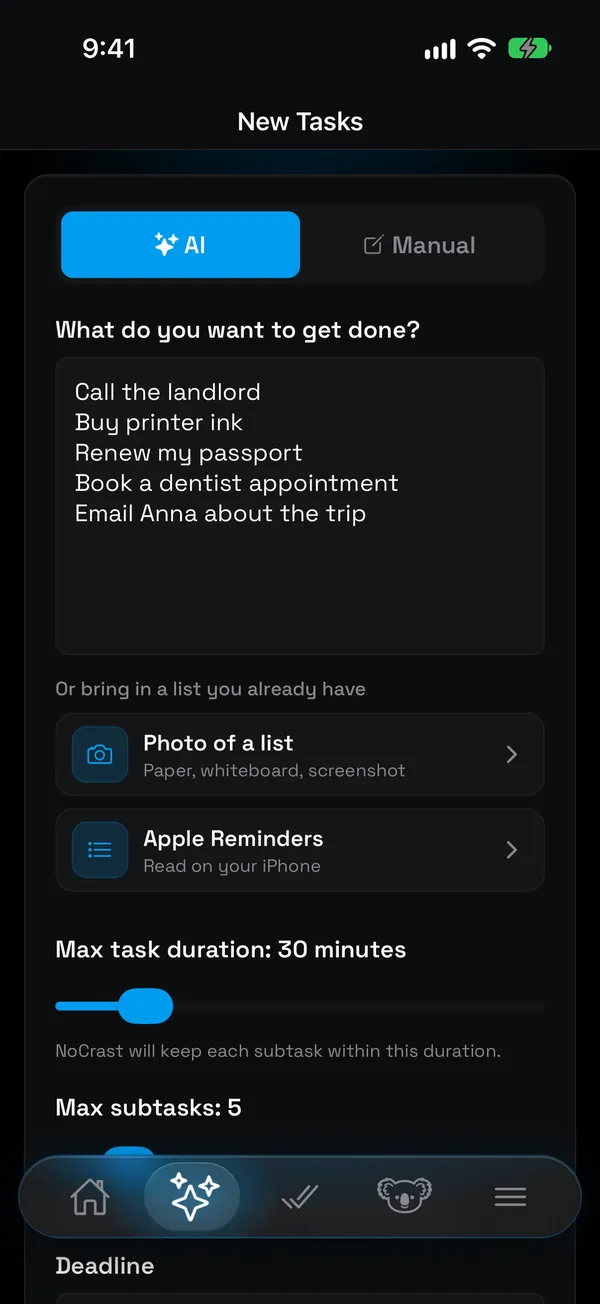
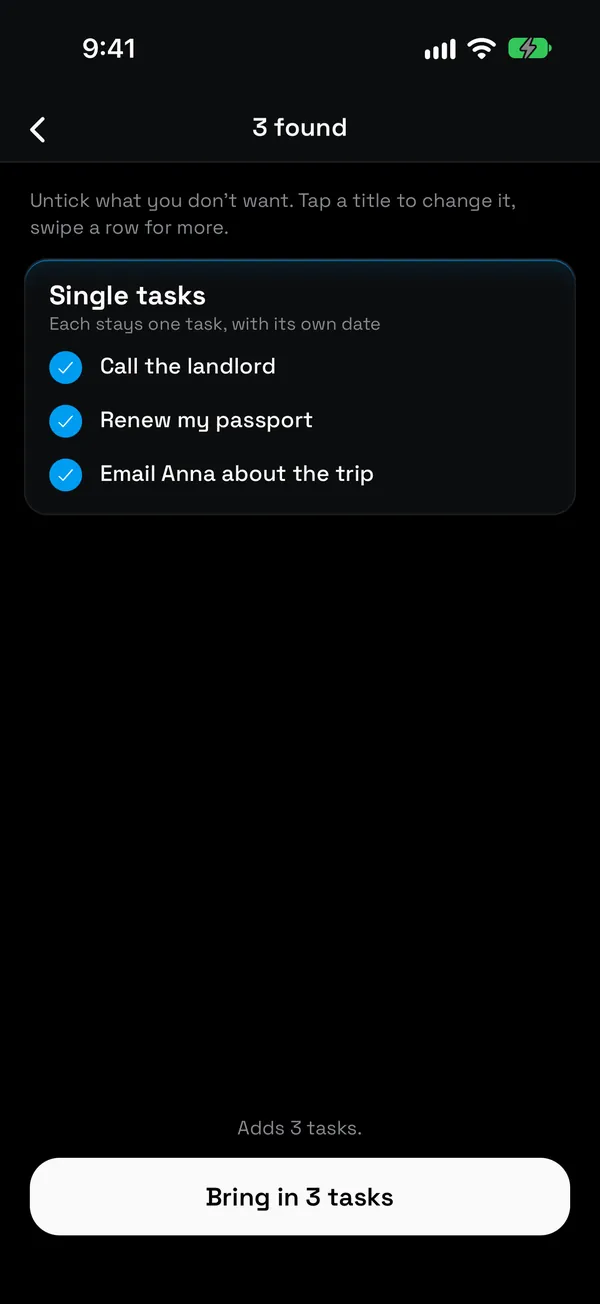
You don't have to start from scratch. Paste a list, take a photo of one on paper, a whiteboard or a screenshot, or on iPhone bring in your Apple Reminders.
NoCrast sorts what it finds: quick things stay single tasks with their own date, and anything bigger becomes a goal with steps. Untick what you don't want, and you are planning in under a minute.
Routines for the things you do anyway
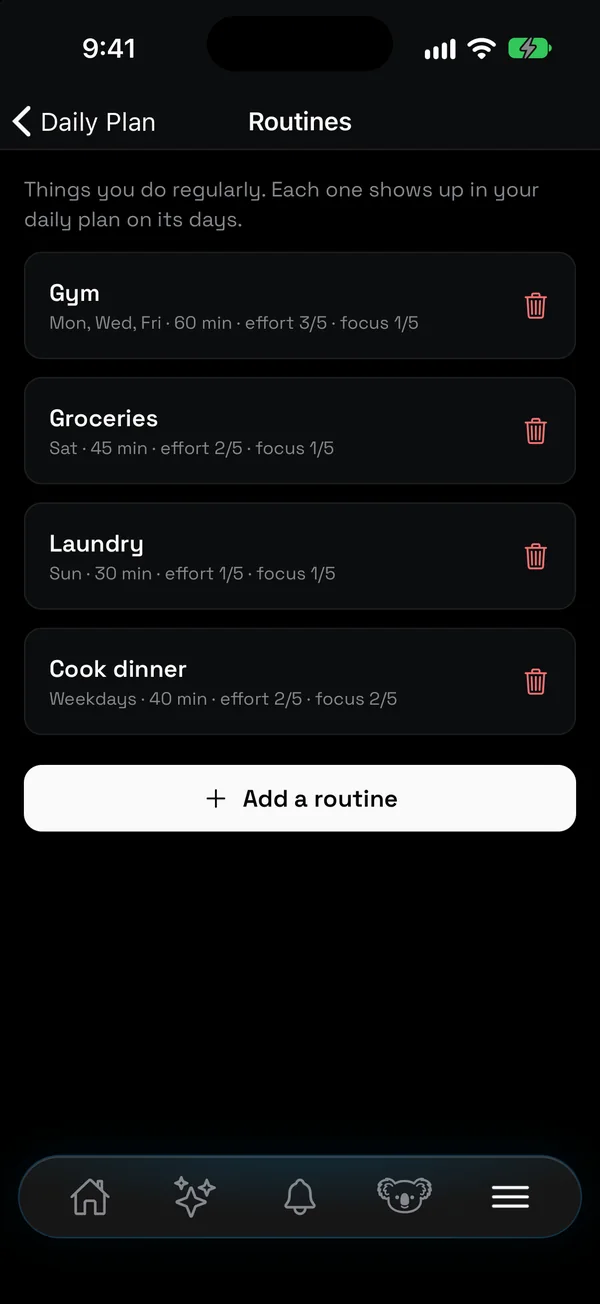
The gym on Monday, Wednesday and Friday. Groceries on Saturday. Laundry on Sunday. Add them once as routines and they show up in your daily plan on their days, with their time, effort and focus, so a full day looks full before you add more to it.
Finishing a routine counts like any other task: it earns minutes too.
Procrastination app, to‑do app or app blocker?
A to-do app knows the work. An app blocker knows the distractions. You need both in one place.
| Compared | To-do app | App blocker | NoCrast |
|---|---|---|---|
| The work | Your list | Not its job | Your list, in small steps |
| A task feels too big | It stays big | Not its job | AI breaks it down |
| You reach for your phone | Nothing happens | The app won't open | Your next step, and what it earns |
| Getting your phone back | Always | Wait, or switch it off | Finish a task, earn minutes |
How to stop procrastinating, with or without an app
Small habits that make starting easier. NoCrast builds most of them in, but every one works on paper too.
- Make the first step tiny. "Open the document and write the headings" is easier to start than "write the report". Once you have started, carrying on is the easy part.
- Decide what comes first before the day starts. Choosing in the moment is where the scrolling sneaks in. Pick today's few tasks in the morning, then just follow the list.
- Put the phone out of reach. Another room works. So does keeping the apps that pull you away on hold until the work is done.
- Work in short blocks. Twenty-five minutes on, five off. Our free Pomodoro timer runs in any browser, no sign-up.
- Pay yourself after, not before. The break, the episode, the scroll: make it the reward for a finished step, not the warm-up.
- Do the task you dread when your energy is highest. For many people that's the morning. Leave the easy tasks for the slump.
- Let a bad day go. Move what you didn't finish to tomorrow and start fresh. A plan you restart beats one you abandon.
Your first day with NoCrast
Pick the one thing you have been avoiding longest and describe it in a sentence. In a few seconds you have a plan: a handful of steps in order, the first one marked for today. It is usually smaller than you feared, something like "list the sections the chapter still needs".
Then choose the apps that tend to win the moment before you start, and the days you want help. Commit to two or three tasks for today, not ten. When you catch yourself reaching for your phone, you will see that first step instead of the feed, and it is short enough that doing it is easier than arguing with it.
Finish it, and you have earned your first minutes. Tomorrow the next step is waiting, and the one after that. That is the whole method: not more willpower, just a smaller first step and a phone that stops offering the way out.
Who NoCrast is for
Students
The thesis chapter, the reading, the exam that is three weeks away and therefore not today's problem. NoCrast makes today's part small and holds the phone until it is done.
Freelancers and remote workers
Nobody checks when you start. Plan the day in a minute, and let the hold do what an office used to.
Anyone with a "someday" project
The portfolio website, the flat that needs sorting, the side project. Describe it once and get a first step you can do tonight.
Questions
What is the best app for procrastination?
One that works on starting, not just on listing. Look for three things: it breaks big tasks into small steps, it keeps distracting apps out of the way while you work, and it rewards you for finishing. NoCrast does all three.
Can an app really help with procrastination?
An app can't make you want to do something. What it can do is make the first step smaller and the distraction further away, and that is often all that stands between you and starting.
Why do I put off even things I want to do?
Wanting the result doesn't make the first step any clearer. When a task is big and its start is fuzzy, anything easier wins, and the phone is always easier. Making the next step small and concrete takes away most of the pull.
Is NoCrast a to-do list?
Yes, and more: a planner with AI task breakdown, a daily plan you set with a swipe, routines, and an app blocker that holds distracting apps until your tasks are done.
How does the AI break down a task?
Describe what you want to get done in your own words. NoCrast suggests a handful of steps with their time, difficulty and mental load, and which depend on each other. You can edit, add or delete any of them.
Can I use the list I already have?
Yes. Paste it, take a photo of it, or on iPhone bring in your Apple Reminders. NoCrast turns it into tasks.
What happens if I don't finish a task?
It comes back the next day. You plan again in the morning, with yesterday's leftovers ready to commit or postpone.
Does NoCrast keep my apps on hold all day?
Only on the days you choose, and only until your tasks are done. Finished tasks earn minutes, and two free 10-minute breaks a day are there for emergencies.
Do I have to use the app blocker?
No. You can plan with NoCrast without holding any apps, and add them later.
Does it work on Android and the web?
Yes. NoCrast is on iPhone and Android, and you can plan on nocrast.app. Your tasks sync between all three.
Is my data private?
The list of apps you hold is kept on your phone only. Your tasks are stored in your account so they sync between your devices.
How much does it cost?
New subscribers get the first 7 days free. After that, NoCrast Premium is monthly or yearly; the app shows the price for your country before you buy.
Start the thing you keep putting off. One small step today.